SONOFF DUALR3 Lite – Dual Channel Wi-Fi Smart Switch with Power Metering
SONOFF DUALR3 Lite – Dual Channel Wi-Fi Smart Switch with Power Metering
Couldn't load pickup availability
The Sonoff Dual R3 Lite is a two-channel (2-gang) Wi-Fi smart relay, featuring scheduling and remote control functions.
The Lite version does not have a power consumption measurement function, and is not suitable for calibrated control of roller shutters or motorized blinds.
However, it includes a motor control mode, making it compatible with bidirectional motors, but without limit switch position detection, nor percentage control of opening or closing.
This module can be used to control two independent circuits, or can be installed behind a double switch in a wall box.
Highlights
- Motor Mode – Beautify your curtains and blinds
Transform your ordinary motorized curtains, roller blinds or venetian blinds into fully smart and automated ones. Voice and App control, accurate percentage adjustment and smart schedules allow you to open or close easily, anytime, anywhere. Ideal for modernizing modern homes with elegance and comfort.
- Switch Mode – Smart Two-Channel Control in one Compact Device
Control two devices independently, from lights to ceiling fans, coffee makers and heaters, with a single compact module. Enjoy complete flexibility for your home automation setup.
- Two-Way Wall Switch Compatibility: A smart solution without losing the switch
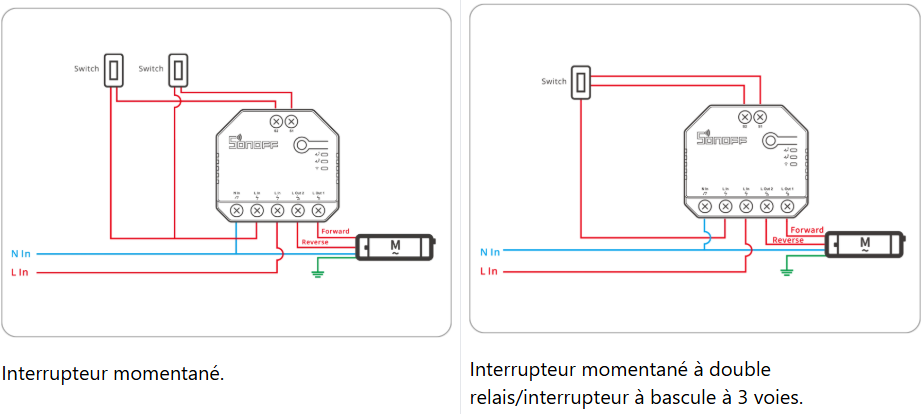
The DUALR3 Lite is compatible with many external wall switches, including toggle, momentary, and SPDT. Enjoy the convenience of manual control without sacrificing smart functionality—ideal for upgrading traditional installations.
- Rail-Ready Design – Easy to Install, Easy to Upgrade
Includes a removable DIN rail mount for quick and secure installation in smart distribution boards. Ideal for DIY enthusiasts and professional installers.
Applications
- Independent control of two devices
Use a DUALR3 Lite to control two separate loads, such as two lighting circuits.
- Smart curtain or blind motor control
Install behind existing roller shutter or curtain switches to enable remote control, timer-based automation, or percentage open/close control (if supported).
- Scheduling and automation scenes
Set on/off timers for lights, fans, or motors. Create smart scenarios to automate tasks, like turning off living room lights and closing curtains during a movie.
- etc...
Specification
|
Model |
DUALR3 Lite |
|
Rating |
100-240V~, 50/60Hz μ |
|
Resistive load |
2400W at 240V-10A/group, 3600W at 240V~15A total |
|
Motor load |
10-240W/1A |
|
Wi-Fi |
IEEE802.11b/g/n 2.4GHz |
|
Frequency range |
2400-2483.5MHz |
|
Max RF Output Power |
Wi-Fi: 19dBm (EIRP) BLE: 4dBm (worst) |
|
Operating systems |
Android and iOS |
|
Number of gangs |
2 gangs |
|
Operating temperature |
-10℃~40℃ |
|
Material |
PC V0 |
|
Dimension |
54 × 49 × 24 mm |
|
Disconnection type |
Type 1 B |
|
Pollution degree |
2 |
|
Rated impulse voltage |
2500V |
Key features of eWeLink
|
Notice: After pairing, select the appropriate mode switch or motor in the eWeLink App according to the type of connected device. |
Switch Mode
|
Device home page features |
|
|
Main Features |
Description of features |
|
On / Off |
Channel 1 on/off status. Channel 2 on/off status. |
|
Schedule |
Configure the device to complete the specified action at the specified time. |
|
Timer |
Set delayed actions that the device is to execute after a specified time. |
|
Loop timer |
The device performs a pre-set action cyclically at specified time intervals. |
|
Device settings |
||
|
Main features |
Feature description |
|
|
Third-party platforms
|
Alexa |
You can control your smart devices via third-party services, including voice control.
|
|
Google Home |
||
|
IFTTT |
||
|
SmartThings |
||
|
Alice |
||
|
Assign location |
Set up the home and room where the device is located. |
|
|
Share |
The device can be shared with other eWeLink accounts. |
|
|
Smart scene
|
Trigger condition |
|
|
Execution action |
|
|
|
LAN control
|
A control method where the app directly communicates with the device through the same router, without going through the cloud platform.
|
|
|
eWeLink remote sub-devices
|
If you have also purchased the SONOFF R5, you can add it as a sub-device to the MINI-RBS. Through the "Scene" function in the eWeLink APP, the two devices can be linked, allowing the Sonoff R5 to function as a convenient wireless remote control. |
|
|
Working mode
|
Switch |
Use the device as a two-way switch.
|
|
Motor |
Use the device as a motor.
|
|
|
Push notifications
|
After enabling "Push notifications", also ensure that notifications are allowed in Phone Settings > Permissions for eWeLink App. This will enable you to receive push notifications when the device status changes.
|
|
|
Logs |
Record device state changes. (You can view the operation records of the past three months.) |
|
|
Power-on state |
The switching status of the device when power is restored after a power failure.
|
|
|
Inching settings
|
The device automatically turns off after being on for a specified duration.
|
|
|
Delete device |
Remove the device from the eWeLink platform. |
|
Motor mode
|
Device homepage functions |
|
|
Main features |
Feature Description |
|
Close/Stop/Open |
Adjust the current working state of the motor. |
|
Percentage adjustment |
Adjust the current position percentage. This function needs to be calibrated before use. |
|
Schedule |
Set the device to complete the specified action at the specified time. |
|
Device Settings |
||
|
Main Features |
Feature Description |
|
|
Third-party platforms
|
Alexa |
You can control your smart devices via third-party services, including voice control.
|
|
Google Home |
||
|
IFTTT |
||
|
SmartThings |
||
|
Alice |
||
|
Allocate location |
Set the home and room where the device is located. |
|
|
Share |
The device can be shared with other eweLink accounts. |
|
|
Smart Scene
|
Trigger condition |
|
|
Execute action |
|
|
|
LAN Control
|
A control method where the APP communicates directly with the device through the same router without going through the cloud platform.
|
|
|
eWeLink Remote sub-devices
|
If you have also purchased the SONOFF R5, you can add it as a sub-device to the MINI-RBS. Through the "Scene" function of the eWeLink App, the two devices can be linked, allowing the Sonoff R5 to work as a convenient wireless remote control. |
|
|
Work mode
|
Switch |
Use the device as a two-way switch.
|
|
Motor |
Use the device as a motor.
|
|
|
Push notifications
|
After enabling "Push Notifications", also be sure to allow notifications in Phone Settings > Permissions for eWeLink App. This will allow you to receive push notifications when the device state changes.
|
|
|
Logs |
Recording of device state changes. (You can view operation records for the past three months.) |
|
|
Network indicator |
|
|
|
Delete device |
Remove the device from the eWeLink platform. |
|
Share