SONOFF iPlug S60 – Zigbee 3.0 Smart Plug Type E/F for Home Automation
SONOFF iPlug S60 – Zigbee 3.0 Smart Plug Type E/F for Home Automation
Couldn't load pickup availability
【Energy Monitoring】Monitor real-time and historical power consumption directly through the eWelink App. Gain insights into your electricity usage, improve appliance efficiency, and effortlessly reduce electricity costs.
【Overload Protection】Safeguard your devices and home by setting up overload protection. The S60ZB will automatically cut off power when excessive current is detected, preventing damage and ensuring safe operation at all times.
【Zigbee Router Device】The S60ZB smart plug acts as a Zigbee router, strengthening your Zigbee mesh network by enhancing signal coverage and communication between devices. Enjoy reliable connectivity throughout your smart home.
【Remote Control】Control your appliances remotely from anywhere with the Smart App. Whether you're at work, on vacation, or simply relaxing on the couch, manage your devices with a tap.
【Timer & Schedule】Create custom schedules and timers to automate your devices according to your lifestyle.
Note: Zigbee hub is required.
Highlights
- Remote Control
Turn your devices on or off from anywhere with the Smart App. Whether you're at work, on vacation, or just on your couch, stay in control with a single tap.
- Timer & Schedule
Set up custom schedules and countdowns to automate your devices according to your lifestyle.
- Energy Overview
Track your energy consumption in real-time and historically, directly from the eWelink app. Get detailed insights.
get insights into your power consumption, optimize the efficiency of your devices, and effortlessly reduce your electricity costs.
- Overload Protection
Protect your devices and home by setting up overload protection. The S60ZBTPF automatically cuts off power in case of excessive current, preventing any damage and ensuring safe operation at all times.
- Zigbee Repeater Device
The S60ZBTPF smart plug is not just a plug: it also acts as a Zigbee repeater, strengthening your Zigbee mesh network by improving signal coverage and communication between devices. Enjoy reliable connectivity throughout your smart home.
Applications
- Rice cooker/electric kettle: remote control and scheduling: prepare your meals or boil water before leaving work, enjoy hot dishes/drinks as soon as you get home.
- Desk lamp/monitor : automatic shutdown after work hours to reduce standby power consumption.
- Charger: Smart timers for phone/tablet chargers to prevent overcharging and extend battery life.
- etc...
|
⚠️ Equipment not recommended:
|
Specification
|
Model |
S60ZBTPF |
|
MCU |
TLSR8656 |
|
Input |
250 V ~ 50/60 Hz MAX 16 A µ |
|
Max. Load |
Voltage: 250V; Current: 16A; Power: 4000W |
|
Standby Power Consumption |
<1W |
|
Wireless Connectivity |
Zigbee 3.0 |
|
Net Weight |
79 g |
|
Dimension |
50x50x61.5 mm |
|
Color |
White |
|
Housing Material |
PC V0 |
|
Applicable Place |
Indoor |
|
Working Temperature |
-10℃~40℃ |
|
Working Humidity |
5%~95% RH, non-condensing |
|
Certification |
CE/RoHS |
eWeLink Key Features
|
Notice:
|
|
Device Home Page Features |
|
|
Key Features |
Feature Description |
|
Turn On/Off Device |
|
|
Energy Monitoring |
|
|
Smart Timer |
|
|
Device Settings |
||
|
Key Features |
Feature Description |
|
|
Assign Location |
Set up the home and room where the device is located. |
|
|
Share Device |
The device can be shared with other eweLink accounts. |
|
|
Third-party Platforms (Add the device to the eWeLink App via SONOFF gateway, then sync it to the corresponding third-party platform via account linking.)
|
Alexa |
voice control (open/close) |
|
Google Home |
voice control (open/close) |
|
|
IFTTT |
voice control (open/close) |
|
|
SmartThings |
voice control (open/close) |
|
|
Alice |
voice control (open/close) |
|
|
Overload Protection |
|
|
|
Push Notifications |
|
|
|
Smart Scene |
|
|
|
LAN Control |
A control method where the app communicates directly with the device through the same router, without going through the cloud platform.
|
|
|
Offline Alert |
Enable "Offline Notifications" and grant notification permissions to eWeLink in Phone Settings > Permissions. You will receive a mobile push notification 5 minutes after the device goes offline.
|
|
|
Historical Logs |
Records of device status changes. (You can view the last three months of operation records). |
|
|
Power-On State |
The device automatically turns off/on after being powered on for a specified duration. |
|
|
Progression Settings |
The device automatically turns off/on after being powered on for a specified duration. |
|
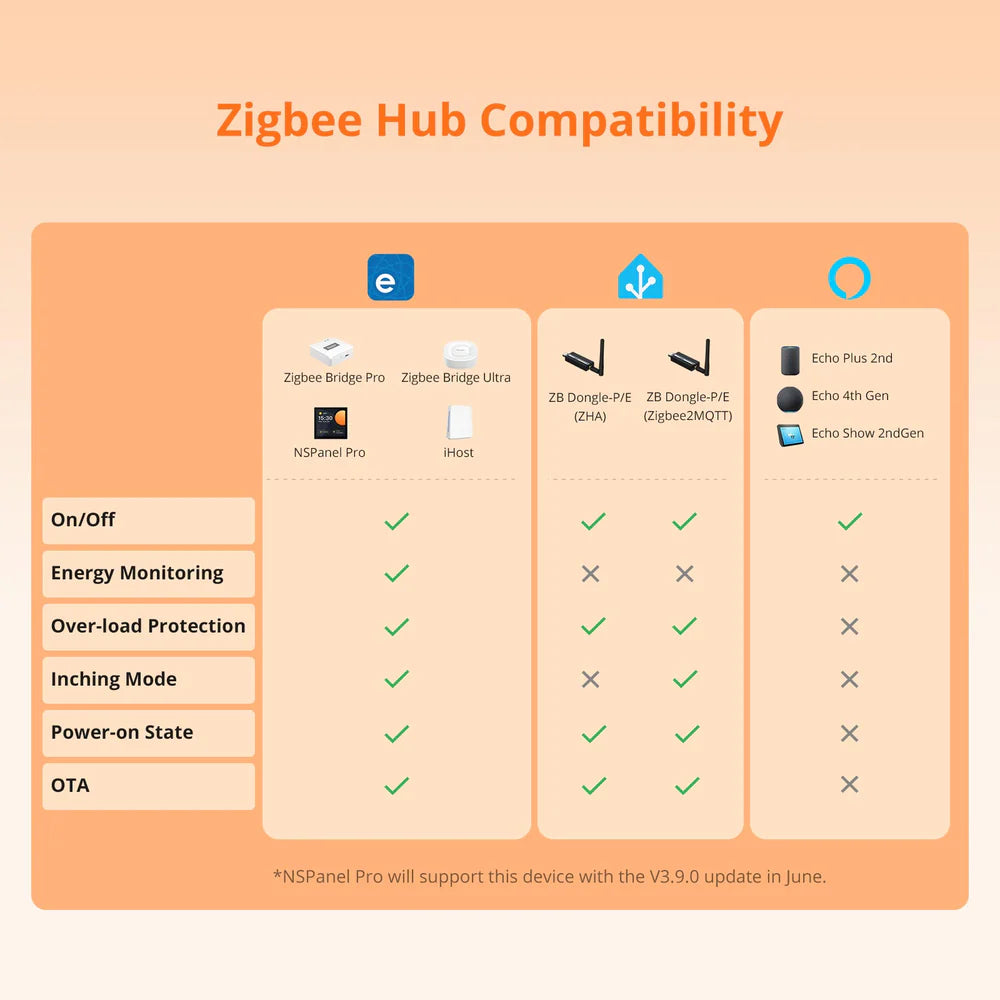
List of Compatible Zigbee Hubs
|
|
eWeLink |
Amazon |
SmartThings |
Home Assistant |
||
|
|
ZBBridge |
ZBBridge Pro ZBBridge Ultra NSPanel Pro iHost |
echo show 2nd echo 4th gen echo plus 2nd |
SmartThings Hub V3 Aeotec SmartThings Home Hub V3 |
ZBDongle-E/P (Z2M platform) |
ZBDongle-E/P (ZHA platform) |
|
On/Off |
√ |
√ |
√ |
√ |
√ |
√ |
|
Energy Monitoring |
× |
√ |
× |
× |
× |
× |
|
Overload Protection |
× |
√ |
× |
× |
√ |
√ |
|
Progress parameters |
× |
√ |
× |
× |
√ |
× |
|
Power-on state |
× |
√ |
× |
× |
√ |
√ |
|
OTA |
× |
√ |
× |
× |
√ |
√ |
|
Notice:
|
Share